Bring your plans and vendor documents together. Understand what changes mean for your budget, and see what needs attention before it becomes costly.
Assist Mi helps event planning teams coordinate complex programs with clearer financial forecasts, easier access to answers, and greater confidence in every commitment. Now in Beta, starting with catering and vendor spend.
Your financial model stays connected to the plan as it changes.
Estimates, commitments, and actuals stay distinct and linked to their sources, so you can see what a change means while you still have options. Your accounting and event systems remain the systems of record.
Send the information. Keep planning.
Import vendor catalogs, returned BEOs, catering workbooks, and program schedules. Assist Mi organizes them into connected, source-linked records and flags conflicting or missing rates for review instead of guessing.
Ask a question. Understand your options.
Compare catering scenarios side by side, from attendance and menu changes to vendor commitments, and ask Ava what a change means for the budget before you confirm it.
Stay ahead of the details.
See budget variance, open balances, conflicts, and readiness gaps such as guarantee deadlines and budget ceilings in one command center, each with the source behind it.
Inside the product
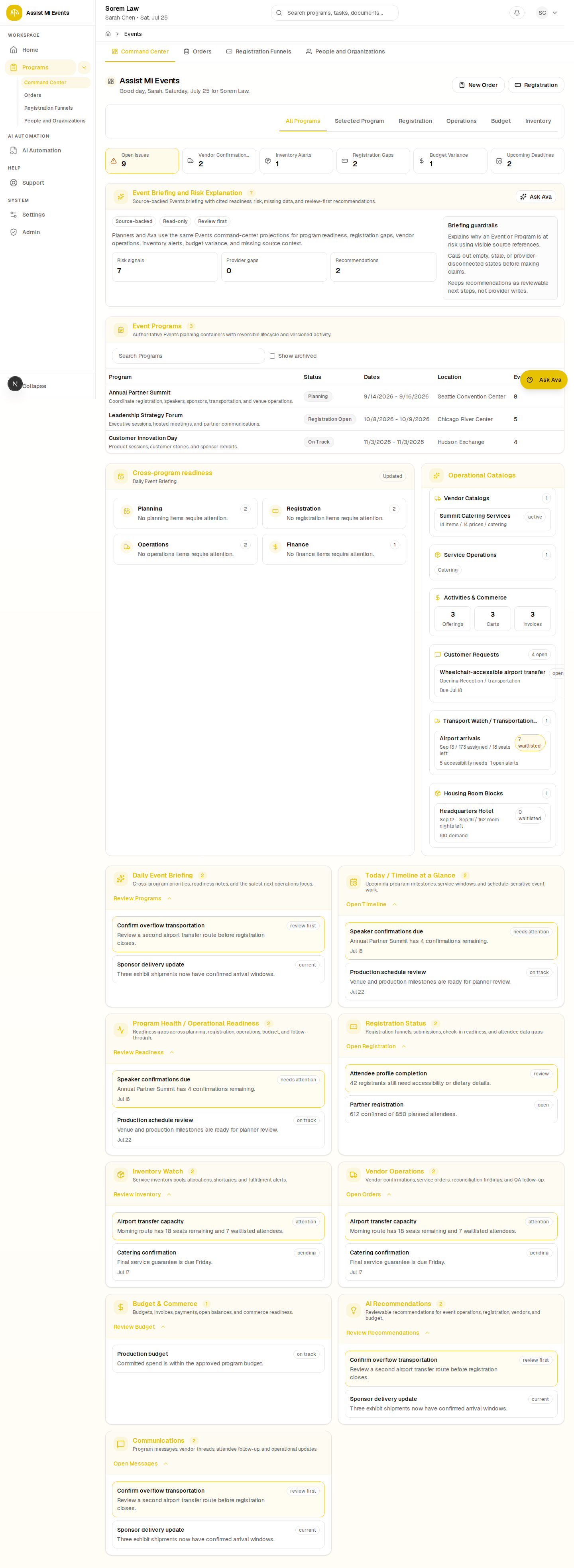
Cross-program operational readiness
Review program readiness, registration gaps, vendor operations, inventory, and budget signals in one command center.
Event software often tracks the work. Assist Mi shows what it means for the budget.
Assist Mi keeps plans, vendor commitments, scenarios, and final bills connected, so a planner sees the financial consequence of a change while the decision is still open.
Plan, commit, and reconcile from one connected record.
Assist Mi keeps planned, committed, forecast, and actual amounts separate, so every number shows where it came from and how confident you can be in it.
Planned, committed, and forecast
Track planned, committed, forecast, and actual amounts for each program, with a forecast at completion and an early signal when commitments run over the plan.
Final bill review
Compare a vendor's final catering bill with the confirmed plan and review each variance before you sign off. Nothing is marked paid or posted to accounting for you.
Client-ready summaries
Prepare a client-facing budget summary you control, showing expected costs, confirmed commitments, and the decisions still open.
Who It's For
Easier for planners. Clearer for everyone accountable for the budget.
Built for event planning companies handling significant budgets, many vendors, changing requirements, and contractual guarantees, where complexity and financial exposure matter as much as size.
Event planners
Less manual coordination and reconciliation, and faster answers about what a change in counts, menus, or vendors will cost.
Agency leaders
Clearer visibility into costs and commitments across programs, so exposure surfaces while there is still time to act.
Clients and budget owners
Forecasts, tradeoffs, and outstanding decisions they can follow, shared on your terms.
Ask Ava
Ask about the money, not just the milestones.
Examples of questions Ava can help answer about catering plans, scenarios, and final bills. Answers point back to the records and documents they come from.
Compare the plated and buffet dinner scenarios.
What changes if attendance drops by 40?
Which catering rates conflict across our documents?
Where does the final bill differ from the confirmed plan?
What is the catering forecast for this program?
Draft a follow-up to the caterer about the open items.
Prepare a client budget summary for Friday.
A Day in the Life
A day planning a complex event with Assist Mi.
The day starts with what needs attention, moves through options and decisions, and ends with a clear update for the client.
7:30 AM
See what needs attention
Review budget variance, open balances, conflicting rates, and readiness gaps across active programs.
9:00 AM
Send the information
Import the updated catering workbook and the returned BEO. Each change is linked to its source.
11:00 AM
Understand your options
Compare catering scenarios for the new headcount and see the budget impact before deciding.
2:00 PM
Confirm commitments
Confirm the chosen plan and approve vendor follow-up before anything is sent.
4:30 PM
Update the client
Share a client-facing summary of expected costs, commitments, and the decisions still open.
A New Way to Work
From reconciling versions to seeing consequences sooner.
Spend less time chasing information and reconciling versions, and more time making the decisions that protect the budget.
Spreadsheets and email
You re-key menus and BEOs into spreadsheets.
You chase vendors to confirm rates and counts.
Conflicting numbers hide across document versions.
Working out what a change costs takes hours.
Final bills are checked line by line at the end.
Clients wait while you rebuild the update.
Assist Mi Events
Imports turn vendor documents into connected records.
Ava prepares vendor follow-up for your approval.
Conflicting rates are flagged with their sources.
Scenarios show the budget impact while choices remain.
Final bills are compared with the confirmed plan, variance by variance.
Client summaries come from the current record.
Plan with confidence. See the financial consequences sooner.
Spend less time chasing information and reconciling versions. Give your team and your clients a clearer picture of expected costs, commitments, and outstanding decisions.